Mastering Bracket Orders: A Trader’s Guide
Bracket orders simplify trading by combining entry, stop-loss, and take-profit levels, but broker limitations can create challenges. Learn how to optimize them with TradersPost.

Marketing

-
Traders ask which brokers take bracket orders, so the guide now lists them, explains OTO and OCO, and says what TradersPost does without brackets and with leftover orders.
Bracket orders are an essential tool for traders aiming to automate risk management with precision. These orders pair an entry with pre-defined take profit and stop-loss levels, providing control and reducing the need for manual intervention. However, using them effectively, especially across different brokers, can be challenging. Let’s explore how bracket orders work, common limitations, and tips for optimizing them with TradersPost.

What Are Bracket Orders?
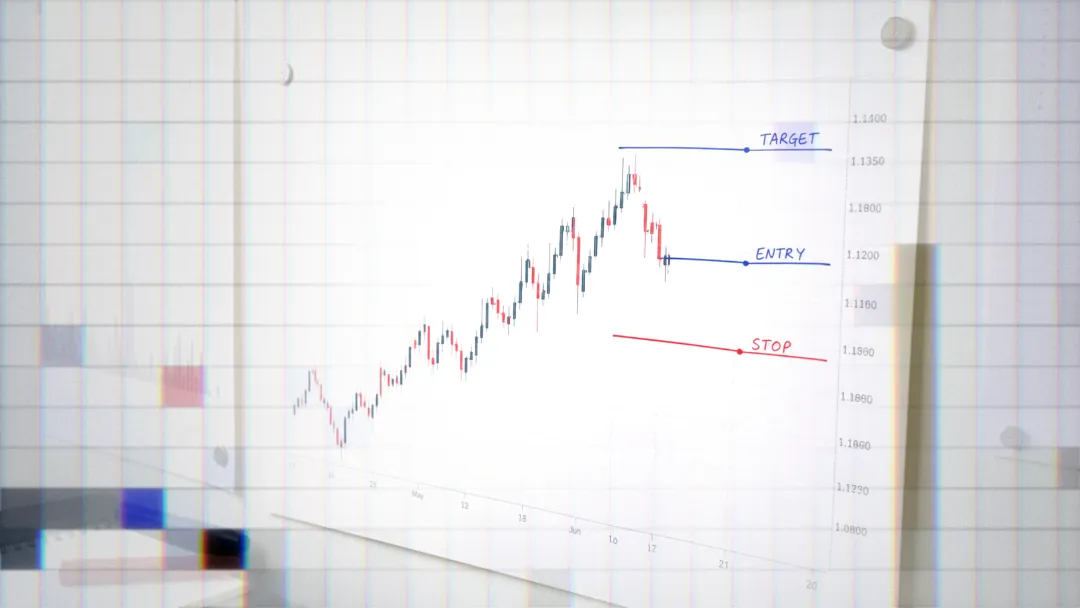
Bracket orders consist of:
- Entry Order: Specifies the price at which the trade will execute.
- Take Profit Order: A limit order to close the trade when the target price is reached.
- Stop-Loss Order: A market or stop order to exit if the price moves against the position.
These orders are typically sent together as a unit, ensuring your trade is protected from the start. Attaching only a stop loss or only a take profit to the entry is an OTO (One-Triggers-Other) order, and some brokers, such as tastytrade, support full brackets but not OTO1.
Challenges with Bracket Orders
1. Broker Compatibility
Not all brokers support bracket orders. When connected to such brokers, the take profit and stop-loss components of the bracket order may be ignored. Brokers that support bracket orders through TradersPost include TradeStation, Alpaca, Tradier, Tradovate, NinjaTrader, tastytrade, and Interactive Brokers1. Alpaca accepts them for stocks only, not crypto or options2.
Impact:
Traders may unintentionally leave positions unprotected if they’re unaware of this limitation.
Solution:
Check your broker’s capabilities before submitting bracket orders. At a broker without bracket support, TradersPost sends the entry alone and drops the take profit and stop loss, and a signal with only one of them fails, so the position has no exits unless you add them.
2. Delayed Stop-Loss and Take Profit
For unsupported brokers, one workaround involves sending the stop-loss and take profit as separate orders after the entry fills. However, this creates a time lag during which the position is unprotected.
Impact:
Even a delay of milliseconds can expose your trade to price volatility, leading to potential losses.
Solution:
TradersPost is exploring a feature to replace the bracket order based on the average entry price after execution. This ensures the stop-loss and take profit are accurately aligned with market conditions, minimizing risk.
3. OCO Constraints
In a full bracket, the two exit orders become active when the entry fills, and once one executes the other is canceled3. Take profit and stop loss orders sent for a position that is already open are not linked as “One Cancels the Other” (OCO), so if one fills, the other may remain active unless canceled manually1.
Impact:
An unmonitored order could trigger an unintended trade.
Solution:
Develop a routine to monitor open orders daily. TradersPost leaves a ticker’s open orders in place when it places the next trade unless you turn on Cancel existing open orders before placing new orders, which is off by default4, and even then a leftover order can still fill between signals.
Tips for Optimizing Bracket Orders
1. Know Your Broker’s Capabilities
Before using bracket orders, review your broker’s features. For unsupported brokers, consider using manual stop-loss and take-profit strategies with alerts.
2. Adjust for Slippage
Slippage can affect the accuracy of stop-loss and take-profit levels. Use tools like TradersPost to calculate slippage and adjust your strategy accordingly.
3. Automate Carefully
When automating, ensure signals from platforms like TradingView align with TradersPost execution. For example, use alerts to trigger market orders if bracket functionality isn’t available.
4. Test in a Simulated Environment
Before going live, test your strategy in a simulation. This helps identify gaps in execution and ensures your plan works across platforms.
Conclusion
Bracket orders are a powerful tool for managing risk and automating trades, but their effectiveness depends on understanding broker limitations and order behavior. With TradersPost’s innovative solutions, traders can overcome many of these challenges, ensuring greater accuracy and control. Stay informed, adapt your strategies, and trade confidently.
References
1 docs.traderspost.io, Order Classes
2 docs.traderspost.io, Alpaca
3 interactivebrokers.com, Bracket Orders for IBKR Desktop | Trading Lesson
4 traderspost.io, Cancel existing open orders before placing new orders






