Automating a TradingView Remix Strategy
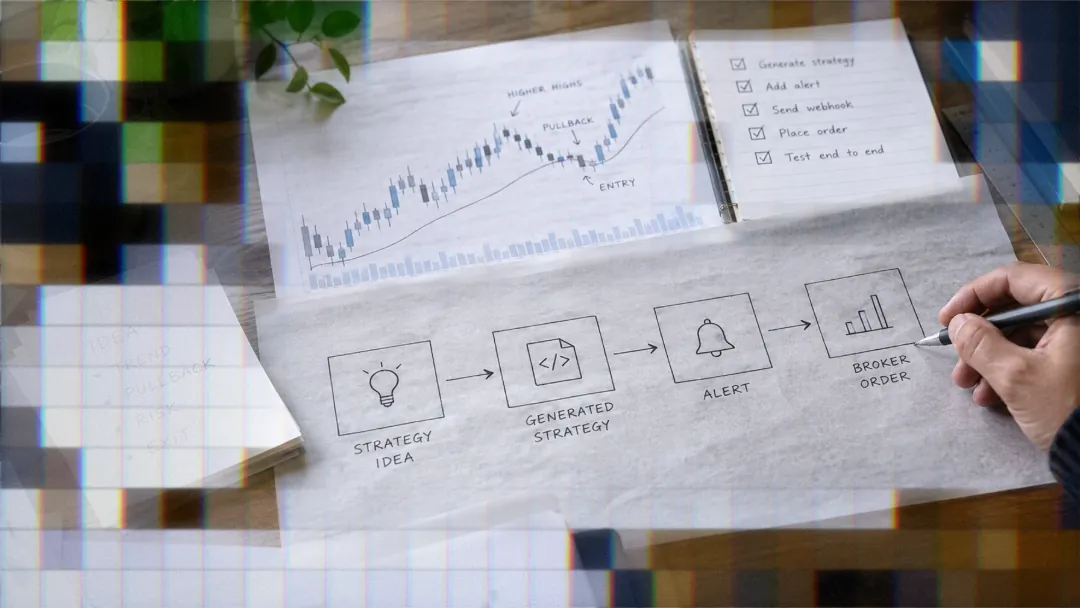
Remix writes plain Pine Script that can fire webhook alerts. Here is the verified path from a Remix-generated strategy to a live broker order.

Marketing

TradingView Remix is the official AI Chart Copilot distributed as a Chrome extension for Chromium-based browsers during its public beta.1 It can write, debug, and apply Pine Script directly to your chart through conversation. The natural question for anyone who has used it to build a strategy is whether that strategy can be automated. The answer is yes, but the path runs through TradingView's alert and webhook system, not through Remix itself.
To automate a TradingView Remix strategy, you need to understand three things: what Remix can and cannot do, what TradingView requires to fire a webhook, and how to structure the payload so an execution layer can route it to your broker. This article walks through each step in sequence, from prompting Remix for the right kind of script all the way to live order routing.
If you want to skip ahead: Remix generates ordinary Pine Script v6, which means any strategy it writes can fire webhook alerts using exactly the same mechanism as a hand-coded strategy. The limitation is that Remix itself cannot place live broker orders. That separation matters, and the rest of this article explains how to bridge it.
What Remix Can and Cannot Do
Remix writes standard Pine Script
Remix is officially called TradingView Remix: AI Chart Copilot.2 Its Pine Script subagent generates Pine Script v6 code, applies it to the Pine Editor, and overlays the result on the chart. Because the output is ordinary Pine Script, every downstream automation path available to hand-written scripts is also available to Remix-generated scripts. Nothing about the code being AI-generated changes how TradingView handles it at the alert layer.
Remix cannot place live broker orders
Remix includes a paper trading feature for practicing with real market data, but it does not execute live orders at any broker.2 Automation of live trades happens through TradingView's alert and webhook system, not inside the Remix extension itself. Pine Script authoring in Remix also requires an Essential plan or higher; the Free tier can read and analyze existing scripts but cannot write or modify them.1
Step 1: Ask for a Strategy
Strategy vs. indicator: why it matters
A Pine Script strategy calls the strategy() function at the top of the script; an indicator calls indicator(). With a strategy, one alert per ticker covers all entry and exit signals using built-in TradingView variables like {{strategy.order.action}} and {{strategy.market_position}}. An indicator requires separate alertcondition() calls and separate alerts for each signal direction, which multiplies the setup and maintenance effort significantly for anyone running multiple tickers.
Prompting Remix for a strategy
Tell Remix explicitly to write a strategy, not an indicator, so the generated code includes strategy.entry() and strategy.exit() calls rather than alertcondition() hooks. Structured prompts produce better output than open-ended ones; specify the entry logic, timeframe, and any risk parameters up front. Before applying generated code to the Pine Editor, Remix will confirm via dialog, a safeguard controlled by the Confirm Destructive Actions preference in Remix settings.3 Leave that toggle on unless you have a specific reason to disable it.
Step 2: Read It and Backtest It
Why you must read generated code
A script you did not write is a script you cannot debug quickly under live-market pressure. One independent review noted edge cases with more complex Remix-generated strategies, so quality inspection before deployment is not optional.3 The most common issue in AI-generated Pine Script is look-ahead bias, where future bar data leaks into a signal calculation and makes backtest results appear better than any live system could achieve.
Using Remix to analyze the backtest
If the strategy is on your chart, Remix can read its full backtest report including net profit, win rate, Sharpe ratio, max drawdown, and the trade list.1 You can ask Remix to optimize parameters through AI-guided sweeps or drill into worst trades to find patterns, all within the same conversation. That said, backtest results do not guarantee live performance. Confirm the underlying logic makes sense before you wire any alerts.
Step 3: Create the Webhook Alert
Alert message payload structure
For a strategy, the alert message should be valid JSON using TradingView placeholders. A complete payload looks like this:
{
"ticker": "{{ticker}}",
"action": "{{strategy.order.action}}",
"sentiment": "{{strategy.market_position}}",
"quantity": "{{strategy.order.contracts}}",
"price": "{{close}}",
"time": "{{timenow}}"
}
TradingView replaces each {{...}} placeholder with a live value at the moment the alert fires. If the alert message is valid JSON, TradingView sends the POST request with an application/json content-type header; plain text uses text/plain.4 TradersPost receives this JSON payload at your webhook URL and maps the action, sentiment, ticker, quantity, and price fields to a broker order. Only fields documented in the TradersPost webhook spec are parsed.
Where to enter the webhook URL
When creating or editing a TradingView alert, a Webhook URL field appears in the Notifications tab. Paste your receiver's URL there; TradingView will POST the alert message body to that URL every time the alert fires.4 Only ports 80 and 443 are accepted by TradingView for webhook destinations; requests to other ports are rejected.4
Step 4: Webhook Requirements That Bite
Plan and authentication requirements
Webhook notifications are not available on the TradingView Free plan; Essential or higher is required.5 Two-factor authentication must also be enabled on your TradingView account before webhook alerts are permitted.4 Alert limits vary by plan: Essential includes 20 active price alerts, Plus 100, Premium 400, and Ultimate 1,000.5
The three-second response rule
If the remote server takes longer than three seconds to process a request, TradingView cancels the webhook delivery.4 TradingView also publishes specific IP addresses it uses to send POST requests, which may need to be allowlisted on firewall-restricted endpoints.4 The alert log's webhook status column lets you monitor delivery for each fired alert.
Relay and timing limitations
Alert webhook delivery from TradingView to external receivers can be delayed for an undetermined time or may not be sent at all. Sending back-to-back signals in the same second can cause race conditions; leaving at least one to five minutes between signals reduces this risk. Failed or rejected orders are never automatically retried once a signal reaches the execution layer.
Step 5: Execution and Order Routing
Mapping alert fields to broker orders
The action field drives order direction: buy opens or covers a long position, sell opens or closes a short, and exit closes any open position regardless of side. The sentiment field, populated by {{strategy.market_position}}, tells the execution layer what the position state should be after the trade: bullish, bearish, or flat. Optional fields like orderType, limitPrice, stopPrice, quantityType, and a stopLoss object can be included in the JSON payload to control execution precisely.
TradersPost maps incoming webhook fields to broker order types. If an orderType sent in the payload is not supported by the connected broker, TradersPost falls back to the default order type configured in the strategy subscription settings.
Position sizing options in the payload
The quantity field accepts a fixed number of shares or contracts when quantityType is fixed_quantity. Alternatively, quantityType can be set to dollar_amount, percent_of_equity, or risk_dollar_amount to let the execution layer calculate size dynamically. Risk-based sizing types such as risk_dollar_amount require a stopLoss object to be present in the payload.
- Fixed: set
quantityTypetofixed_quantityand pass a share or contract count inquantity - Dollar-based: set
quantityTypetodollar_amountand pass the target notional inquantity - Equity percent: set
quantityTypetopercent_of_equityfor dynamic sizing relative to account value - Risk-based: set
quantityTypetorisk_dollar_amountorrisk_percentand include astopLossobject
If you are running a Remix-generated strategy and want to automate it end to end, TradersPost connects TradingView alerts to your broker account, handling order routing and fallback logic automatically.
What About Remix Paper Trading
Remix paper trading scope
Remix includes a paper trading feature that lets you execute orders, manage positions, and track P&L through chat using real market data.1 This paper trading environment is internal to Remix and does not connect to TradingView's native simulated trading or to any external broker. It is useful for testing strategy ideas through conversation but cannot validate webhook delivery or order routing behavior.
Testing the full automation path
To test the complete signal-to-broker pipeline without risking capital, use TradingView's alert system with a paper trading broker connection rather than Remix's internal paper mode. Checking the TradingView alert log confirms the correct payload is being sent; the log shows the exact message delivered for each fired alert. You can also include "test": true in the webhook payload to process a signal without sending an order to your broker, which is useful for verifying payload structure independently of execution.
Bottom Line
Key takeaways
- Remix generates ordinary Pine Script v6; any strategy it writes can fire webhook alerts using the same mechanism as hand-coded strategies.
- Automation happens through TradingView's alert system, not inside Remix. Remix cannot place live broker orders.
- Webhook alerts require a paid TradingView plan (Essential or above) and two-factor authentication enabled on your account.4
- TradingView cancels webhook delivery if the receiving server does not respond within three seconds, and delivery is not guaranteed.4
- Always read and backtest Remix-generated code before connecting it to live alerts; AI-generated scripts can contain logic errors that only surface under specific market conditions.3
Frequently Asked Questions
Can Remix automate trades directly without TradingView alerts?
No. Remix can paper trade but cannot execute live orders at any broker.2 Live automation requires wiring the Pine Script strategy Remix generates to TradingView's alert and webhook system, then routing those webhooks to an execution layer connected to your broker.
Do I need a paid TradingView plan to use webhooks?
Yes. Webhook notifications are only available on paid TradingView plans; the Free tier does not include this feature.5 The Essential plan is the entry point for webhook access. Higher tiers increase active alert limits: Plus supports 100 active alerts, Premium 400, and Ultimate 1,000.5 Two-factor authentication must also be enabled on your TradingView account before webhooks will function.4
What TradingView plan do I need to use Remix's Pine Script feature?
Pine Script authoring in Remix requires an Essential plan or higher. Free-tier users can read and analyze existing Pine scripts but cannot write or modify them.1 The Remix weekly usage limit also scales with your TradingView plan tier, so higher plans provide more AI requests in addition to unlocking Pine coding.
Why use a strategy instead of an indicator in Remix?
A strategy requires only one alert per ticker because TradingView placeholders like {{strategy.order.action}} and {{strategy.market_position}} carry the signal direction and position state dynamically. An indicator requires separate alertcondition() calls and separate alerts for each signal type, which multiplies the number of alerts you need to create and maintain.
What happens if my webhook receiver is slow?
TradingView cancels the webhook request if the receiving server takes longer than three seconds to respond.4 Additionally, TradingView webhook delivery is not guaranteed and can be delayed for an undetermined period, so monitoring the alert log is important for diagnosing missed signals.
References
1 TradingView Remix - Official AI Chart Copilot
2 TradingView AI Chart Copilot: public beta is available now
3 TradingView Remix Complete Guide (2026)
4 How to configure webhook alerts - TradingView Support
5 TradingView Pricing