TradingView Broker Integration Explained
How TradingView's Broker Integration API connects brokers to the platform, what data and trading endpoints require, and how webhook automation fits in.

Marketing

A tradingview broker integration is a broker-built connection that places the broker’s accounts, order controls, positions, and market data inside TradingView. It uses TradingView’s Broker Integration API, which connects the broker’s backend systems to the TradingView web interface.1
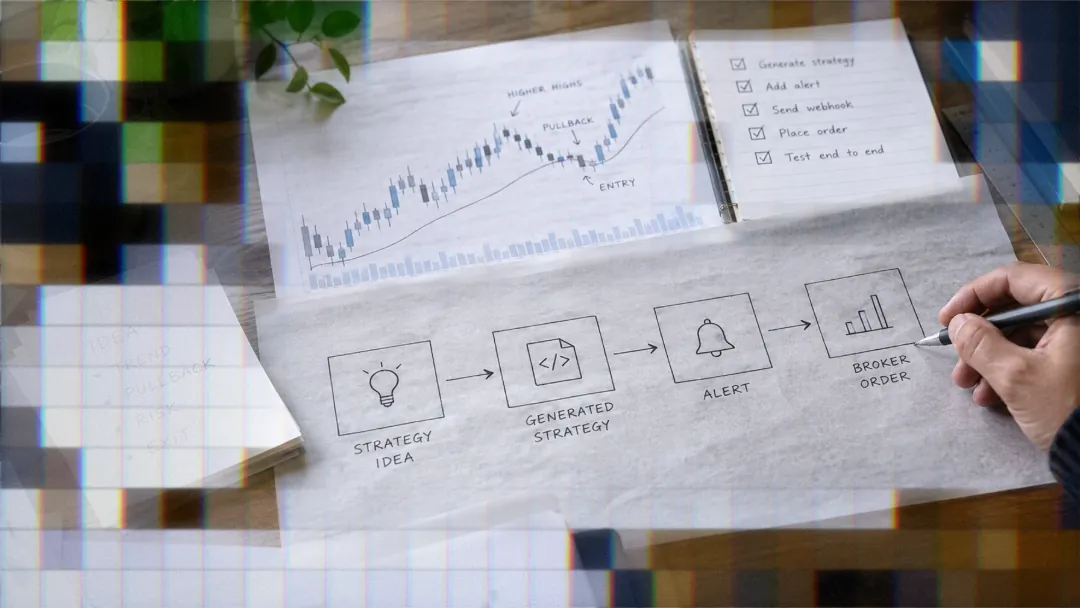
This native connection is different from alert automation. A trader can also send TradingView alert data to a webhook URL, where an external service processes the JSON message and routes trade instructions to a connected broker. Understanding the distinction helps traders choose between TradingView’s built-in Trading Panel and an alert-driven automation workflow.
What Broker Integration Means Here
Native Trading Panel vs Alerts
The Broker Integration API is designed for brokerage firms that want their platform supported inside TradingView. Once integrated, customers can authenticate with the broker and use the Trading Panel to interact with accounts, instruments, orders, and positions.
TradingView alerts provide a separate path. An alert can send a structured JSON message to a webhook URL without requiring the broker to build a native Trading Panel integration. The receiving service decides how to interpret and route that message.
Data Integration vs Trading Integration
A native integration has two independent parts. Data integration uses a server-to-server architecture, while trading integration uses a client-server architecture. The parts may use different base URLs and authentication methods.2
Data must pass through TradingView’s servers because the TradingView website does not receive broker market data directly. TradingView’s servers use that data for charting, indicators, and server-side alerts before relaying it to the client.
Who Actually Builds This
The broker implements the integration according to TradingView’s Broker Integration Manual. Individual traders do not install or build these API endpoints.
The trading portion can handle order placement, position closing, and related order management. The data portion supplies symbol specifications, price streams, historical bars, and user data permissions.3
How Integration Architecture Works
Client-Server Trading Requests
Trading requests travel directly from the user’s browser to the broker’s server. TradingView’s server is not part of that exchange. The exception is /permissions, which TradingView sends from its server when determining whether a user may access particular market data.4
Because the browser initiates these requests, the broker must configure Cross-Origin Resource Sharing, commonly called CORS, for every applicable response.
Server-to-Server Data Requests
Forex and crypto data must be connected through the broker because those prices are not linked to one specific exchange. For CFDs mapped to exchange-listed stocks, the broker may reuse existing TradingView data through /mapping.5
If TradingView already receives the market data from another provider, such as an exchange, the broker may only need /mapping. That endpoint reconciles differences between the broker’s instrument names and TradingView’s symbols.
Streaming vs Polling Endpoints
A regular REST request opens an HTTP connection, returns a response, and closes the connection. A streaming endpoint keeps the connection open so updates can arrive without another polling cycle.
Brokers may implement a subset of the available trading streams, with TradingView configuring the selected streams upon request. TradingView recommends streaming alternatives because they reduce latency and update the interface faster.6
Required Trading and Data Endpoints
Core Trading Endpoints
A trading integration requires endpoints for accounts, configuration, instruments, active orders, order history, executions, account state, and quotes. The core set is:
/accounts,/config, and/instruments/orders,/ordersHistory, and/executions/stateand/quotes
Correct /quotes behavior is critical. If it fails, the Buy and Sell fields in TradingView’s Order Ticket can appear empty. TradingView also warns that quote problems can cause delays or execution at unexpected prices.7
/config, /accounts, /instruments, /ordersHistory, /executions, and /permissions are processed once at login. Other requests occur because of user actions or according to configured polling intervals.
Optional Endpoints and Conditions
An integration must implement /positions, /balances, or both. Crypto brokers require /balances, while Crypto Spot trading does not use /positions.
Feature flags determine several other requirements. Order previews require /previewOrder. Level 2 data requires /depth. Leverage support requires /getLeverage, /previewLeverage, and /setLeverage.8
/mapping applies to exchange-based instruments using third-party TradingView data. It must not be used for forex because broker prices can differ. The /permissions endpoint can restrict data access or hide symbols according to factors such as login, location, or subscription plan.
Data Integration Endpoints
Data integration uses /symbol_info, /history, /streaming, and /groups. Together, they describe instruments, return historical bars, stream live prices, and organize symbols into groups.9
TradingView requests /symbol_info every 30 minutes to keep specifications current. Historical updates follow a scheduled cadence, and TradingView recommends that /history support 20 requests per second for optimal updates.10
Real-Time Price Streaming Rules
What the Stream Must Carry
The data /streaming endpoint uses HTTP 1.1 chunked transfer encoding, not WebSocket. It must remain open and contain real-time updates only, never snapshots.
The stream must provide trades and quotes. If real trades are unavailable, the API must generate artificial trades using the bid price and bid size, or the midpoint with zero size for forex. Every quote must include the best bid and best ask, and updates cannot be delayed by more than one second.11
Matching Streaming to History
Bars built from live /streaming messages must match bars later returned by /history. TradingView allows mismatches on no more than 5 percent of bars for frequently traded symbols. Historical data must also avoid unreasonable price gaps, incorrect prices, and holes in one-minute or daily history.12
This consistency matters because TradingView initially displays bars constructed from streaming ticks, then replaces them with historical data after a chart reload. A mismatch can trigger a false alert.
TradingView establishes up to four simultaneous /streaming connections and expects identical data on each. The broker must avoid closing the connections or applying restrictions that interrupt the approved TradingView clients.
Authentication, CORS, and Security
Supported Authentication Types
TradingView supports PasswordBearer, ServerOAuth2Bearer, and OAuth2Bearer using Code Flow for broker authentication. The /authorize endpoint is required only for PasswordBearer. ServerOAuth2Bearer and OAuth2Bearer Code Flow do not require it.13
CORS and HTTPS Requirements
Broker responses must allow the specific requesting origin. Required origins include TradingView subdomains, staging subdomains, and the local address used by TradingView developers:
*.tradingview.com*.xstaging.tvlocalhost:6285
Missing CORS configuration can cause login failures, a Failed to fetch message, or a browser-console error stating that no Access-Control-Allow-Origin header is present.14
HTTPS is mandatory. TradingView’s Content-Security-Policy and HTTP Strict Transport Security prevent the site from requesting broker resources over insecure HTTP.
Handling Concurrent Sessions
TradingView permits multiple concurrent sessions, allowing a user to connect from environments such as desktop and mobile simultaneously. A broker may still enforce its own session limits according to its internal policies.
Configuring Accounts and Sub-Accounts
Three Configuration Levels
Configuration occurs at three levels: broker settings from /config, sub-account settings from /accounts, and instrument settings from /instruments. All three requests run once during login.
When the same interface element appears at multiple levels, the more specific setting wins. Instrument configuration overrides account configuration, which overrides broker configuration.15
Structuring Multiple Sub-Accounts
A broker can separate sub-accounts by instrument type, such as stocks and crypto, or by region, such as United States and European stocks. Each account may return a different instrument list and configuration.
The type field in /accounts identifies demo and live accounts. The prefix field limits Symbol Search to instruments matching the active sub-account, which is useful when separating product groups such as CFDs and spread bets.
Polling Intervals and Refresh Speed
Broker-level polling intervals control the frequency of requests to /quotes, /orders, /positions, /balances, and /state. These intervals cannot be configured separately at the account or instrument level.
TradingView reduces any value that exceeds an endpoint’s permitted maximum. Lower interval values make orders, positions, quotes, and balances update faster, but the broker must ensure its infrastructure can sustain the resulting request rate.16
Testing and Deploying an Integration
Staging, Production, and Sandbox
Integration development uses production, staging, and local environment types. Production serves end users, staging supports testing, and local access allows TradingView developers to troubleshoot against the broker’s staging or production systems.
The sandbox at beta-rest.xstaging.tv is a functional copy of TradingView used to verify the integration’s trading behavior and user experience before release.17
Getting Sandbox Access
Before receiving sandbox access, a broker must pass the trading and data automated tests on Jenkins and make its market data available in TradingView’s staging environment when using its own symbols.
The broker also supplies IP addresses for whitelisting, OAuth2 credentials when applicable, and an SVG icon for the Trading Panel and login dialog. The specified icon size is 56 by 56 pixels.
Final Testing Rounds
When an integration includes trading and market data, the data must be available in TradingView’s stable environment before the first final testing round. It must then be available in the production environment before the second round begins.18
Automating Without Native Broker Support
Webhooks as a Separate Path
TradingView alerts can send JSON instructions to a webhook URL independently of the native Broker Integration API. TradersPost receives the TradingView alert webhook and routes its trade instructions through the strategy’s connected broker account.
This means a trader can build an alert-driven workflow even when the broker has not created a native TradingView Trading Panel integration. The broker connection and the alert receiver still need to be configured correctly, but the broker does not need to implement TradingView’s native endpoint architecture.
What a Payload Can Carry
A single JSON signal can include ticker, action, quantity, orderType, takeProfit, and stopLoss. The minimum TradersPost message requires ticker and action, while resize also requires quantity.
Available actions include buy, sell, exit, reverse, breakeven, cancel, add, and resize. Nested fields such as stopLoss.trailPercent and takeProfit.percent can define protective instructions in the same message as an entry.
Native API or Webhook
Choose the native integration when you need the broker’s accounts and order interface embedded in TradingView. In that model, the broker controls its Trading Panel implementation, available instruments, account configuration, and order-management endpoints.
Choose webhook automation when Pine Script or indicator alerts are the source of trade instructions. TradersPost is one example of an external automation layer that accepts TradingView JSON signals and sends the resulting instructions through a connected broker account.
If your broker is not available through TradingView’s native Trading Panel, review how webhook-based routing works, then test the complete alert, payload, strategy settings, and broker connection before enabling automatic submission.
Bottom Line
- Native broker integration is built by the broker, not installed by an individual trader.
- Trading requests go from the browser to the broker, while market data goes through TradingView’s servers.
- Reliable quotes, persistent streaming, matching historical bars, CORS, and HTTPS are core integration requirements.
- Webhook automation is a separate option for routing TradingView alerts without a native Trading Panel connection.
The practical decision is whether you want to trade manually through an embedded broker interface or automate structured alerts through an external routing layer. For automation, start with a paper or test workflow and verify symbols, quantities, order types, protective orders, and alert timing before moving to live execution.
Frequently Asked Questions
How do data and trading differ?
Data integration is server-to-server and sends symbols, prices, and historical information to TradingView’s servers. Trading integration is client-server, with browser requests going directly to the broker. The two parts may use different URLs and authentication methods.
Does integration require real-time streaming?
Yes, data integration requires a persistent HTTP 1.1 chunked connection through /streaming. It carries live trades and quotes rather than snapshots. Trading integration also offers streams such as /stream/orders and /stream/quotes as alternatives to polling.
How is price accuracy checked?
TradingView compares real-time bars built from /streaming with historical bars returned by /history. Frequently traded symbols cannot exceed the allowed 5 percent mismatch threshold, and historical data must not contain unreasonable gaps or holes.
Can alerts trade without native integration?
Yes. TradingView alerts can send JSON to a webhook receiver, which can process the signal and submit corresponding instructions through a connected broker account. This workflow is separate from the broker-built Trading Panel integration.
Which authentication methods are supported?
The supported types are PasswordBearer, ServerOAuth2Bearer, and OAuth2Bearer using Code Flow. PasswordBearer requires /authorize. OAuth2Bearer Code Flow sandbox setup requires the client identifier, authorization URI, client secret, and token endpoint URI.
References
1 TradingView REST API for Brokers
2 Integration Overview
3 TradingView REST API for Brokers
4 Integration Overview
5 Integration Overview
6 Endpoint Requirements
7 Endpoint Requirements
8 Endpoint Requirements
9 Endpoint Requirements
10 Integration Overview
11 Stream of Prices
12 Integration Overview
13 Endpoint Requirements
14 Integration Overview
15 Configuring
16 Configuring
17 Integration Overview
18 Integration Overview