How to Create Alerts in TradingView
TradingView integration guide: setup, features, automation options, and broker connectivity for enhanced trading.

Marketing

-
TradingView now documents watchlist and multi-condition alerts, while TradersPost documents narrower broker support than claimed, so the article's alert options and integration claims have been corrected while its core setup guidance remains sound.
TradingView alerts act as your vigilant trading partner, constantly monitoring the markets and notifying you the moment your specified conditions are met. By using alerts, you ensure that you are always ready to seize trading opportunities, even when you're not actively watching the charts. This blog post will guide you through creating and optimizing alerts on TradingView, with practical examples and tips. We'll also explore how TradersPost integrates seamlessly with TradingView to enhance your automated trading strategies.
Understanding TradingView Alerts
Types of Alerts
TradingView offers technical alerts for price, indicator, chart pattern, strategy, and drawing-tool conditions, as well as watchlist alerts:1
- Price Alerts: These are the most straightforward alerts that notify you when an asset’s price hits a certain level. You can specify whether you want the alert to trigger when the price crosses above or below a set threshold or moves by a particular percentage.
- Oscillator Alerts: Ideal for monitoring indicators like RSI (Relative Strength Index) and Stochastic oscillators. Set these alerts to notify when these indicators enter overbought or oversold zones.
- Moving Average Alerts: Use these for tracking crossovers between moving averages or when price interacts with them.
- Strategy Alerts: Generated using Pine Script strategies, these alerts can incorporate complex logic and multiple conditions, offering a sophisticated approach to automated trading.
Configuring Basic Price Alerts
Creating a basic price alert in TradingView is easy:
- Select Chart Area: Right-click on the chart, a line, or a channel at the desired price level, or use the alert button, Alert manager, or keyboard shortcut1.
- Set Conditions: Choose from options like crossing up, crossing down, greater than, or less than, and combine up to five conditions in one alert2.
- Notification Settings: Select how you'd like to receive notifications (e.g., popup, email, mobile push, browser notification, or webhook)3.
- Name Your Alert: Label it descriptively for easy identification later.
Advanced Alert Configuration
Indicator-Based Alerts
To create more sophisticated alerts, integrate technical indicators into your strategy:
- Add Indicators: Begin by adding your preferred indicators to your chart.
- Access Alert Setup: Click on the indicator and select "Create Alert."
- Define Conditions: Specify conditions such as RSI > 70 or MACD crossovers.
- Test Before Use: Always validate that the alert functions as intended before deployment.
Strategy Alerts via Pine Script
Strategy alerts allow deep customization through Pine Script:
- Incorporate multiple conditions within your script.
- Utilize custom calculations for more precise triggers.
- Integrate these scripts with TradersPost for seamless execution across brokers like Alpaca, TradeStation, Tradier, and Interactive Brokers.
Effective Alert Management
Optimizing Alert Settings
To make the most out of TradingView alerts:
- Prioritize Key Levels: Set alerts at significant support/resistance levels or psychological prices.
- Volume Consideration: Incorporate volume data when setting price-based alerts for added confirmation.
Remember to regularly clean up non-performing alerts and test them against historical data for validation.
Common Mistakes to Avoid
Avoid setting too many alerts that can lead to clutter and missed opportunities:
- Focus on high-probability setups.
- Organize related alerts by strategy or timeframe.
Failing to dynamically adjust alert levels based on market changes can reduce effectiveness. Regularly review and adjust settings according to market volatility and trends.
TradersPost Integration Benefits
Integrating TradersPost with TradingView enhances your trading capabilities significantly:
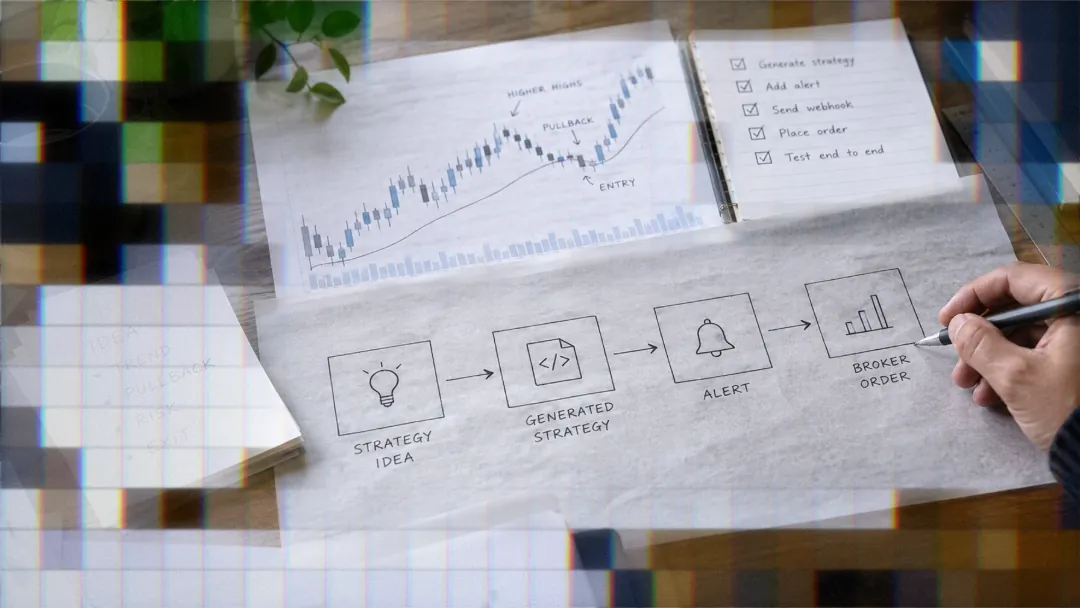
- Automated Execution: Connect TradingView alerts directly with execution platforms through webhooks offered by TradersPost.
- Risk Management Tools: Utilize TradersPost's built-in risk management features to maintain control over position sizing and exposure.
- Portfolio Coordination: Manage multiple strategies effectively by coordinating trades across different assets through TradersPost.
- Performance Monitoring: Keep track of system performance with detailed analytics provided by TradersPost integrations.
By leveraging TradersPost's functionality, traders can bridge the gap between strategy formulation on TradingView and live market execution.
Conclusion
In summary, mastering TradingView alerts allows you to stay ahead in fast-moving markets without constant supervision. By learning how to set up different types of alerts efficiently, you optimize trade timing while minimizing emotional decisions. When paired with TradersPost's automation capabilities, these tools form a robust foundation for executing advanced trading strategies seamlessly across various brokers like Alpaca and Interactive Brokers. Begin optimizing your alert systems today—enhance your trading acumen with precision monitoring powered by TradingView and dynamic execution facilitated by TradersPost.
References
1 Introduction to TradingView alerts
2 tradingview.com, Introducing multi-condition alerts
3 TradingView Features — Power Up Your Analysis & Trading